Tag Archives: mobile OS

Matias Duarte’s “Mobile is Dead” Emphasizes Designing for PDIs

In a video interview with Josh Topolsky for The Verge, Matias Duarte, Head of Design at Android, and formerly of webOS fame, said, “Mobile is dead.”

…Duarte’s point is that in an age in which users seamlessly transition from one screen size to another during their day, the idea that designers should consider mobile as a distinct category is outdated.

via Matias Duarte, Head of Android Design on the Death of Mobile — Our blog.

There’ve been a number of articles recently that resonate with this idea, and the core of it is the need for design to be more user-focused than ever, but with the expanded vision of their activities and experiences being distributed throughout their lives, days, devices, and environments.

That’s the idea behind my “Personal Digital Infrastructures (PDIs)”—which I first mentioned in User Experience of Ecosystems—and, with the forthcoming mainstreaming of wearables and The Internet of Things, it’s an idea that will only become more important.

iOS 7: Apple Removed Text Message Options in Messages

iOS 7: Apple Removes Text Messaging Options in Messages

No Text Messages For iDevices! iMessage or the Highway!

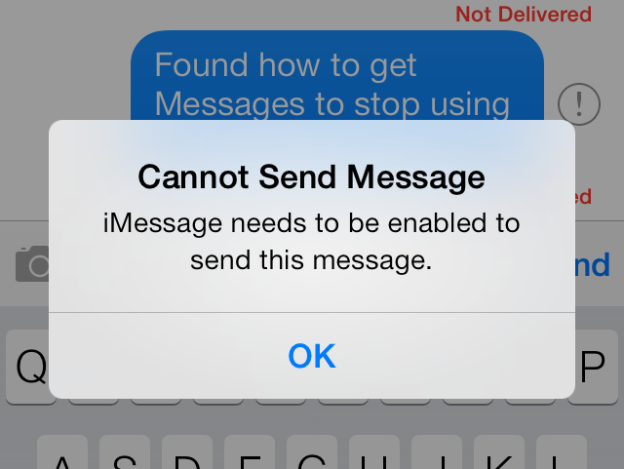
There are numerous stories reporting on an iMessage bug or outage that meant that iMessages failed to send or took a long time to send. In iOS 6, this wasn’t too big a problem, because users could pretty easily just resend that failed message as a text message. Not in iOS 7, at least based on my own iPhone 4S.

When iMessage failed in iOS 6, resending a message as text message could be done two ways. One way to invoke that was to long-press on a sending message, then tap "Send as Text Message" from the context menu. That was also an option when an iMessage failed to send. Tapping on the red exclamation point next to the failed iMessage would bring up a dialog box with the option to "Send as Text Message".

Neither of those options seem to be available anymore. So, Apple has stripped away the abilty to choose to use normal text messaging between Apple’s devices (iPhone, iPads, Macs?) when iMessage fails. The only way to send text messages between two "i-devices" is when one of them has iMessage turned off in Settings > Messages.

Sending messages to those without iMessage (so, all non-Apple phones) continues to be available as it should be.

Continue reading →

iOS 7: First Impressions and Reactions [UX Think-Aloud 1]

iOS 7: First Impressions and Reactions [UX Think-Aloud 1]

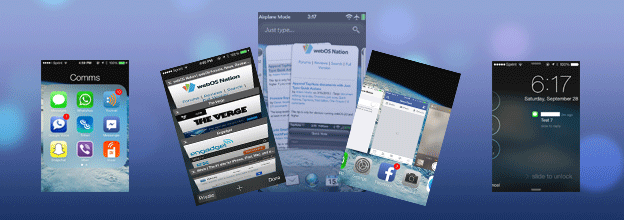
Summary: This first UX Think-Aloud article focuses on my first week with iOS 7 on my iPhone 4S, noting my impressions and reactions during actual usage after updating my iPhone 4S on September 20, 2013 (two days after it’s official release). I note UX flaws, design choices I would have made differently myself, places where the drive towards "flat design" degrades the iOS UX from its more "skeuomorphic" predecessors (e.g., unmarked text, tappable or not? Sometimes!), bugs, and more. Observations include how to get to the weather app and the new calendar widget in the Notification Center, pros and cons in the changes to the the presentation of launcher folders (one step forward and three steps back) and the most recently used app list (webOS-like, but not enough), and changes in Messages (timestamps! finally!). Certainly, iOS 7 has UX flaws and other bugs, but all OSes do. It may not be revolutionary, but I doubt iOS 7 is a death knell for its users’ ability to use their iPhones.

Continue reading →

Multitasking updated in iOS 7 with new card-style interface | iMore.com

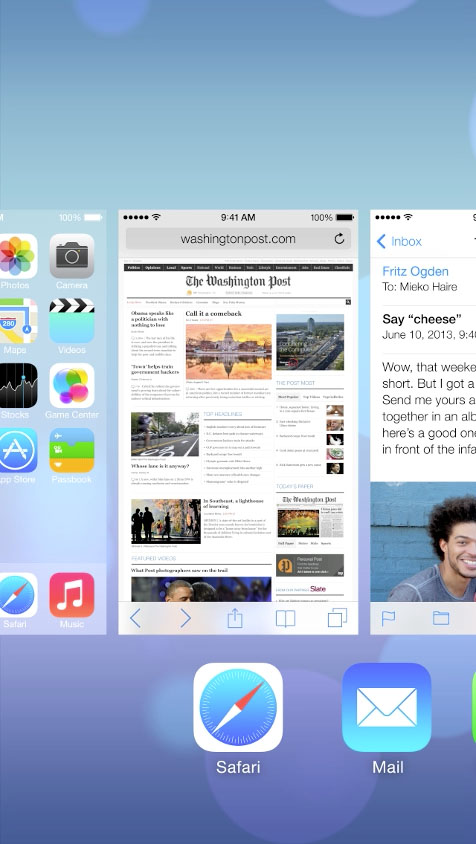
Multitasking updated in iOS 7 with new card-style interface | iMore.com.

Gyahhhh!!!! "Who needs multi-tasking?" the webOS naysayers and Apple fanboys said when dismissing webOS. Apparently, you did, and you didn’t know it, and Apple wasn’t going to be able to give it to you until four years after webOS released their first phone with it on June 6, 2009.

It appears to still require a double-tap of the Home button to invoke that multi-tasking view, a gesture that I find much more onerous than it should be given how much I want to switch between my open apps. But to dismiss a card? Swipe the card up off the screen. That latter should be familiar to anyone with any familiarity with webOS! See for yourself in Apple’s iOS 7 video–watch it from the 4:20 mark.

I’m not the only one to notice this, of course. GigaOm’s article Much iOS 7 design inspiration came from others but Apple elegantly puts it all together notes this parallel with webOS as well, though they missed the swipe-up parallel for dismissing a card.

I’m venting, and this state of affairs only brings this bitter, hilarious bit of genius back to mind (warning: video contains offensive language):

…and yes, I was in attendance at HP’s Think Beyond event to which the above video was a reaction.

Source: I first read about this on a webOS Nation Forum thread. Thanks to user virtualkyr who started that thread.

Incoming Calls Shouldn’t Interrupt Video Recording on Smartphones

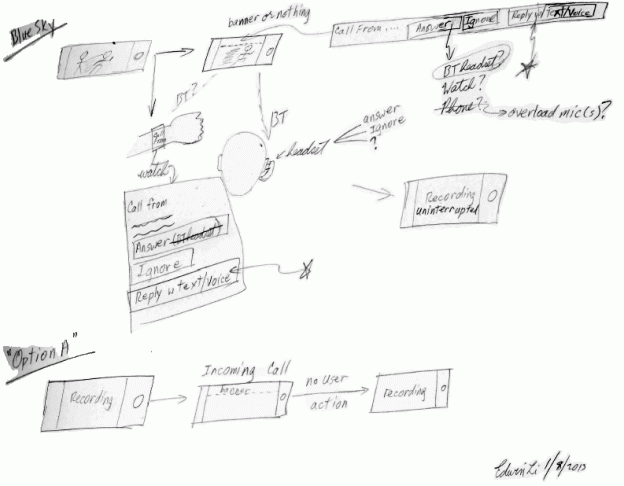
Summary: Smartphones should not interrupt users’ video recording sessions when calls come in, especially if users choose to ignore those calls, whether through inaction or via tapping “ignore” on a notification. Yet, this is what happens with the phones running the current leading mobile Oses, iOS (5, 6.1) and Android (including 4.1 JellyBean). In contrast, webOS v2.2.3 and Windows Phone 7.5 only stop recording when users choose to take the incoming call. The quick UX lesson is easy—that the latter behavior is how it should be; do not interrupt users’ activity unless absolutely necessary. The larger UX lessons include: prioritize users’ activities over system ones when possible and offer both more flexible multi-tasking and more thoughtful use of unobtrusive notifications to accommodate that prioritization.

Continue reading →

Amazon MP3s Now Buyable Via iOS: Grants +2 to Its “Your Music, Anytime, Anywhere, Any Device” Aura

The Amazon MP3 store is now optimized for iOS devices….[so now], you can purchase music from Amazon’s catalog…directly from an iPhone or iPod touch…. Additionally, purchases will be available for immediate streaming and download from within Amazon’s Cloud Player iOS app.

via Amazon now selling MP3s directly to iPhone, iPod touch users | The Verge.

This is Amazon fleshing out their coverage of user activities—with their ability to give you access to your already-purchased content from so many different hardware-tied ecosystems (iOS, Android, PC/Mac) already, they had a pretty thorough coverage of the user-focused goal of "my content, anywhere, from any device" (e.g., their Kindle, Cloud Player, and their respective apps). This move adds the coverage of the user activity "adding to my content" in a way that makes it immediately accessible—again, anywhere, from any device. That coverage of most of most users’ music and other content activities is a key part of iTunes’ success.

Along with their recent AutoRip feature, which puts any AutoRip-enabled CDs that you purchase or have purchased from them going back to 1998 automatically, instantly in your Cloud Player, Amazon’s music buying options may well be the fastest way to make your music purchases available "at any time, from any place, no transferring or synching–your music, everywhere" (from one of Amazon’s Cloud player videos).

More of what most users will want to do with Amazon’s content will now be even more platform-independent. This is Amazon building out their their content-delivery and storage ecosystem to out-flank all the hardware-tied ecosystems’ obstacles, offering those users a way to loosen those other ecosystems’ hold on them.

What could be next goals for Amazon in this vein? Maybe giving that same freedom to the other content that they sell: books, hopefully in various bundles with their ebook and Audible audiobook versions, and movies (offering bundles or just straight bundling streaming rights or digital copies with purchases of DVDs and Blu-ray discs).

Freeing users of arbitrary constraints? That’s a good thing.

Nuance’s Wintermute Could Be a “PDI-Level Property/Service”

…Project Wintermute [is] a platform agnostic voice recognition service that lives in the cloud…. intelligently saving search queries and context across platforms.

via Nuance hopes to make cross-platform voice recognition a reality with Project Wintermute | The Verge.

As a platform-agnostic personal assistant, Wintermute would be perfectly positioned to free users from vendor-delineated ecosystems. Its ability to work with multiple—in an ideal world, all—vendors’ ecosystems, would free users to use whatever ecosystems’ components they wanted, with Wintermute serving then as a PDI-level (Personal Digital Infrastructure, i.e., the users’ ecosystem of hardware, software, content, services, and social connections) service, or a property of the PDI.

Imagine: Whatever you want to use or access, regardless of whether it is beholden to iOS, Android, Windows Phone 8, webOS, or Blackberry—just talk to Wintermute, and she’ll take care of it. Not quite Jarvis1, but a step in the right direction.

1 Jarvis is the name of Tony Stark’s, a.k.a., Iron Man’s, computer in the "Iron Man" (2008, 2010) and "Marvel’s The Avengers" (2012) movies.

User Experience of Ecosystems

Ecosystems: Past, Present, and…

The rise of Apple’s iPod inspired the use of the word “ecosystem” in the computer industry–at the time, primarily referring to the pairing of software and hardware that was iTunes and the iPod, respectively. The use of the word, bringing with it its ecologically-based notion of complex and critical interdependence–was intended to suggest a system that should be considered together as a whole, each part contributing to the success of the rest.

Today, “ecosystem” in the computer and consumer electronics world refers to much more–smartphones, tablets, computers, accessories, computer operating systems, mobile operating systems, application stores for each of those, even developers of the software for any of those, cloud services, and web sites. Most of what is written about these things focuses on a particular piece–reviews of smartphones, tablets, computers, operating systems; the time has come to consider the next level and to actively create a vision of what that future ecosystem should look like.

User-Focused Ecosystems: Personal Digital Infrastructures (PDIs)

I believe that ecosystems should be considered in terms of user experience and actively designed as a whole to be user-focused; sure, the user experience of any particular smartphone or tablet is important, but, in a world in which each individual is potentially the owner of an increasing number of increasingly capable, networked devices, the important questions should turn from those like “how well does this device work” or “how well do these devices work together” to those like “how well can this ecosystem serve its owner in an elegantly concerted way?”

Our separate devices, software, services, data, and content should not only work together, they should work together to support their user–a sort of personal digital infrastructure (PDI) that would be an intelligent substrate enabling effortless access to all of the things we need and want in our ecosystem and seamless interoperability within it.

The user experience challenge is how to ensure that users’ ecosystems enable them to spend their time on their activities and tasks rather than wrestling with the technologies and tools they use to get those done.

Continue reading →